> ## Documentation Index
> Fetch the complete documentation index at: https://docs.kelviq.com/llms.txt
> Use this file to discover all available pages before exploring further.
# Configuration & Customization
> Configure and customize checkout experiences for your customers
Checkout in Kelviq allows you to collect payments from customers. You can generate checkout links for your products, customize the checkout experience, and support multiple payment options and billing periods.
## Overview
Kelviq's checkout system:
* **Powers your sales** - Collect payments and create customer subscriptions
* **Integrates with Stripe** - Uses Stripe as the payment processor
* **Highly configurable** - Control plans, pricing, trial periods, and more
* **Multi-currency ready** - Support customers worldwide
* **Easy to embed** - Generate links for any product and plans
## Generating Checkout Links
Checkout links are generated at the **product level**. Each link can include one or more plans.
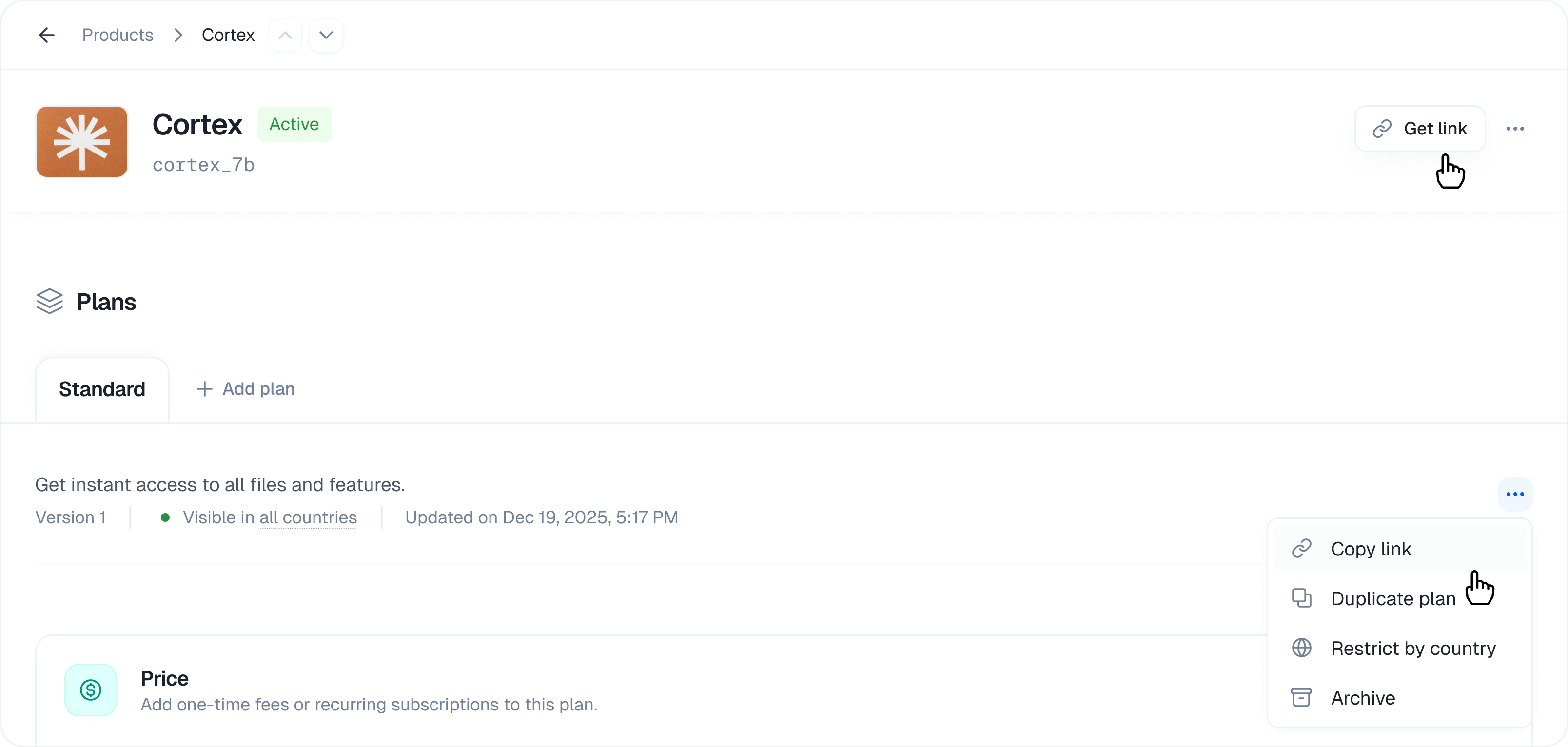 ### Quick Start
1. **Go to Products** → Select your product
2. **Click "Generate Checkout Link"** → Opens the link builder
3. **Select plans** → Choose which plans to include
4. **Configure options** → Set defaults and features
5. **Copy link** → Share with customers
### Quick Start
1. **Go to Products** → Select your product
2. **Click "Generate Checkout Link"** → Opens the link builder
3. **Select plans** → Choose which plans to include
4. **Configure options** → Set defaults and features
5. **Copy link** → Share with customers
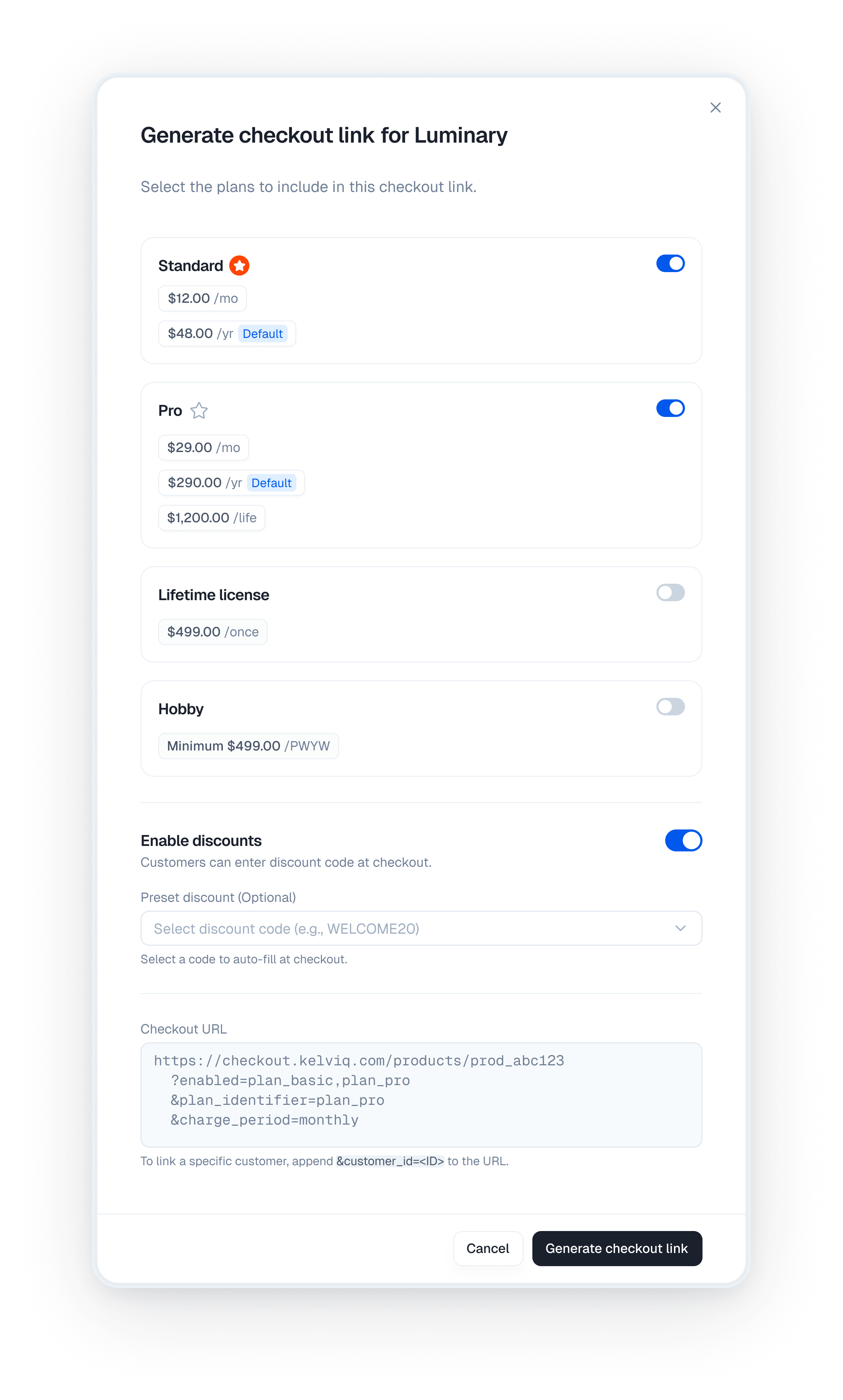 ### Link Format
Generated checkout links follow this pattern:
```
https://checkout.kelviq.com/products/{PRODUCT_ID}
?enabled={PLAN_1_ID},{PLAN_2_ID}
&plan_identifier={DEFAULT_PLAN_ID}
&charge_period={DEFAULT_PERIOD}
```
Example:
```
https://checkout.kelviq.com/products/prod_abc123
?enabled=plan_basic,plan_pro
&plan_identifier=plan_pro
&charge_period=monthly
```
## Multi-Plan Checkout
Include multiple plans in a single checkout to let customers choose their tier.
### Configuration
**Plans Configuration**
* Select which plans are enabled (shown to customer)
* Choose a recommended plan (highlighted by default)
* Cannot disable all plans
* Disabled plans don't appear in checkout
### Example: Multi-Plan Pricing
Your product has 3 plans: Free, Pro, Enterprise
```
Plan 1: Free
├─ Enabled: Yes
├─ Price: $0/month
└─ Show in checkout: Yes
Plan 2: Pro (Recommended)
├─ Enabled: Yes
├─ Price: $29/month
└─ Show in checkout: Yes (selected by default)
Plan 3: Enterprise
├─ Enabled: Yes
├─ Price: Custom quote
└─ Show in checkout: Yes
```
Generated checkout URL:
```
?enabled=free,pro,enterprise&plan_identifier=pro
```
## Billing Periods & Pricing
### Supported Billing Periods
Plans in Kelviq can support multiple billing periods:
| Period | Duration | Use Case |
| ------------ | --------------- | ------------------------------------------ |
| **Monthly** | 1 month | Recurring subscriptions |
| **3 Months** | 3 months | Quarterly billing |
| **Yearly** | 12 months | Annual billing, often with discounts |
| **One Time** | One-off payment | Digital products, courses, lifetime access |
### Setting Default Billing Period
Configure which billing period is pre-selected for each plan:
```
Plan: Pro
├─ Monthly: $29/month (default for checkout)
├─ Yearly: $290/year (saves $58)
└─ Checkout pre-selects: Monthly
```
In your checkout link:
```
&charge_period=monthly
```
### Pricing by Period
Different plans can have different pricing for the same period:
```
Plan: Basic
├─ Monthly: $9/month
└─ Yearly: $90/year
Plan: Pro
├─ Monthly: $29/month
└─ Yearly: $290/year (2.5% discount vs monthly)
Plan: Enterprise
├─ Monthly: $99/month
└─ Yearly: $999/year (16% discount vs monthly)
```
Customers see all options and can choose their preferred period at checkout.
## Free Trials
Offer free trial periods before charging customers.
### Configuring Trials
1. **Open your plan** → Go to the plan's pricing section
2. **Enable Free Trial** → Toggle the trial option
3. **Set duration** → 1-365 days (default 30)
4. **Save plan**
### Trial Behavior
When a customer starts a trial:
```
Timeline:
Day 0: Customer signs up, trial begins
Days 1-30: Customer has full access, no charge
Day 30: Trial ends, first billing occurs
Day 31+: Regular subscription
```
### Trial Configuration Example
```
Plan: Professional
├─ Regular price: $29/month
├─ Free trial: 30 days
├─ After trial: Full charge of $29
└─ Customer can cancel anytime during trial
```
Trials reduce payment friction. Customers are more likely to convert from trial to paid if they've experienced value.
## Advanced Checkout Configuration
### Custom Return URL
After checkout succeeds, redirect customers to your custom URL:
```
Customer completes purchase
↓
Kelviq redirects to your success page
↓
You can:
- Show confirmation
- Deliver files/licenses
- Set up their account
- Continue onboarding
```
Configure in your checkout link via API or dashboard:
```
&return_url=https://yourdomain.com/checkout-success
```
### Discount Code Integration
Allow customers to apply discount codes at checkout:
### Link Format
Generated checkout links follow this pattern:
```
https://checkout.kelviq.com/products/{PRODUCT_ID}
?enabled={PLAN_1_ID},{PLAN_2_ID}
&plan_identifier={DEFAULT_PLAN_ID}
&charge_period={DEFAULT_PERIOD}
```
Example:
```
https://checkout.kelviq.com/products/prod_abc123
?enabled=plan_basic,plan_pro
&plan_identifier=plan_pro
&charge_period=monthly
```
## Multi-Plan Checkout
Include multiple plans in a single checkout to let customers choose their tier.
### Configuration
**Plans Configuration**
* Select which plans are enabled (shown to customer)
* Choose a recommended plan (highlighted by default)
* Cannot disable all plans
* Disabled plans don't appear in checkout
### Example: Multi-Plan Pricing
Your product has 3 plans: Free, Pro, Enterprise
```
Plan 1: Free
├─ Enabled: Yes
├─ Price: $0/month
└─ Show in checkout: Yes
Plan 2: Pro (Recommended)
├─ Enabled: Yes
├─ Price: $29/month
└─ Show in checkout: Yes (selected by default)
Plan 3: Enterprise
├─ Enabled: Yes
├─ Price: Custom quote
└─ Show in checkout: Yes
```
Generated checkout URL:
```
?enabled=free,pro,enterprise&plan_identifier=pro
```
## Billing Periods & Pricing
### Supported Billing Periods
Plans in Kelviq can support multiple billing periods:
| Period | Duration | Use Case |
| ------------ | --------------- | ------------------------------------------ |
| **Monthly** | 1 month | Recurring subscriptions |
| **3 Months** | 3 months | Quarterly billing |
| **Yearly** | 12 months | Annual billing, often with discounts |
| **One Time** | One-off payment | Digital products, courses, lifetime access |
### Setting Default Billing Period
Configure which billing period is pre-selected for each plan:
```
Plan: Pro
├─ Monthly: $29/month (default for checkout)
├─ Yearly: $290/year (saves $58)
└─ Checkout pre-selects: Monthly
```
In your checkout link:
```
&charge_period=monthly
```
### Pricing by Period
Different plans can have different pricing for the same period:
```
Plan: Basic
├─ Monthly: $9/month
└─ Yearly: $90/year
Plan: Pro
├─ Monthly: $29/month
└─ Yearly: $290/year (2.5% discount vs monthly)
Plan: Enterprise
├─ Monthly: $99/month
└─ Yearly: $999/year (16% discount vs monthly)
```
Customers see all options and can choose their preferred period at checkout.
## Free Trials
Offer free trial periods before charging customers.
### Configuring Trials
1. **Open your plan** → Go to the plan's pricing section
2. **Enable Free Trial** → Toggle the trial option
3. **Set duration** → 1-365 days (default 30)
4. **Save plan**
### Trial Behavior
When a customer starts a trial:
```
Timeline:
Day 0: Customer signs up, trial begins
Days 1-30: Customer has full access, no charge
Day 30: Trial ends, first billing occurs
Day 31+: Regular subscription
```
### Trial Configuration Example
```
Plan: Professional
├─ Regular price: $29/month
├─ Free trial: 30 days
├─ After trial: Full charge of $29
└─ Customer can cancel anytime during trial
```
Trials reduce payment friction. Customers are more likely to convert from trial to paid if they've experienced value.
## Advanced Checkout Configuration
### Custom Return URL
After checkout succeeds, redirect customers to your custom URL:
```
Customer completes purchase
↓
Kelviq redirects to your success page
↓
You can:
- Show confirmation
- Deliver files/licenses
- Set up their account
- Continue onboarding
```
Configure in your checkout link via API or dashboard:
```
&return_url=https://yourdomain.com/checkout-success
```
### Discount Code Integration
Allow customers to apply discount codes at checkout:
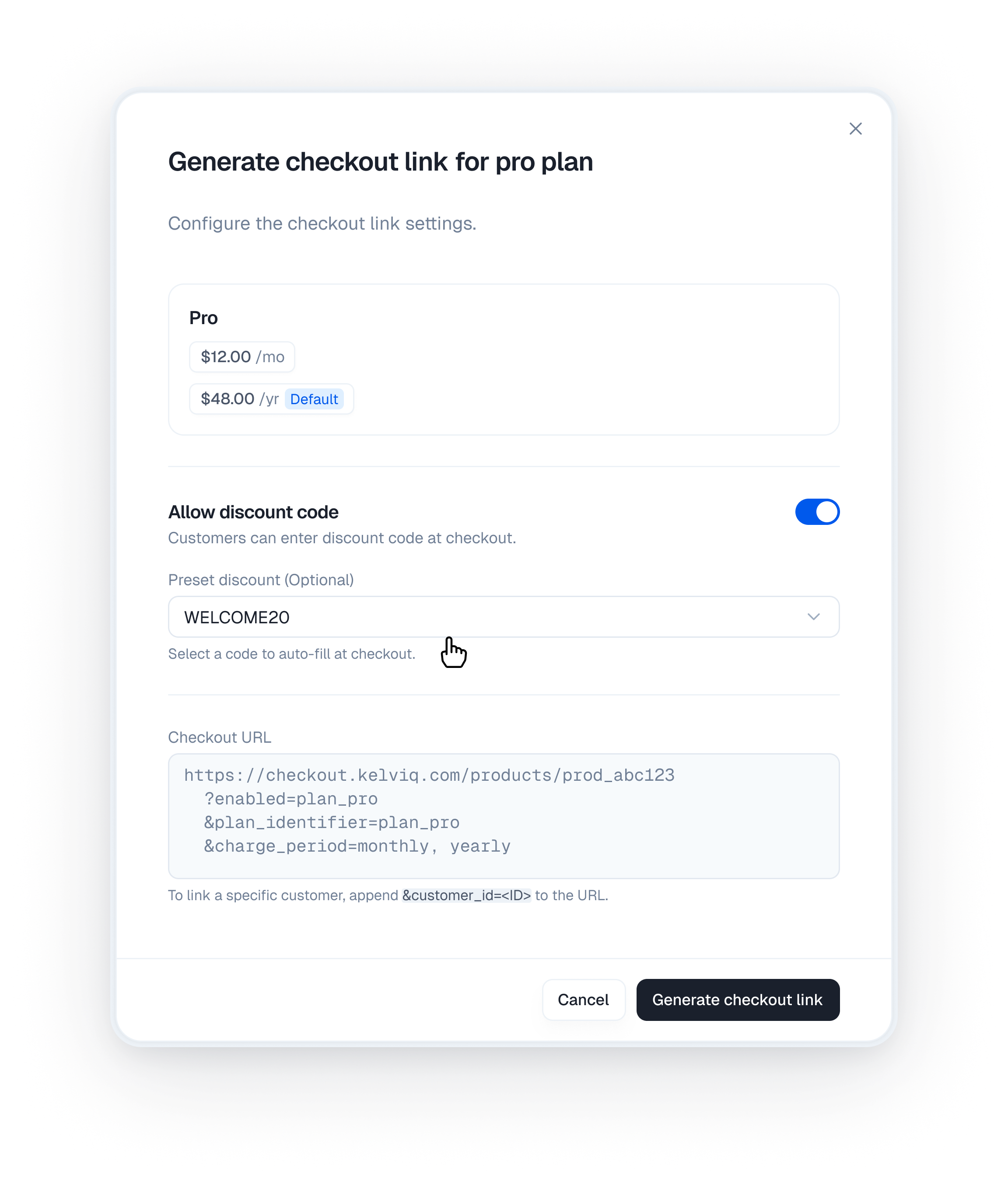 ```
Customer at checkout:
1. Select plan and period
2. (Optional) Enter discount code
3. See adjusted price
4. Complete payment
```
Discount codes are applied automatically if the customer enters a valid code.
### Tax Collection
Kelviq can collect and handle taxes:
**Tax ID Collection:**
* Customers can enter their tax ID (VAT number, EIN, etc.)
* Used to determine applicable taxes
* Required for some jurisdictions
**Configuration:**
* Enable/disable tax collection per product
* Taxes are calculated based on customer location and tax ID
### Country Restrictions
Restrict plans to specific countries:
```
Plan: Premium Tier
├─ Available countries: US, UK, CA, AU
├─ Restricted countries: China, Russia
└─ Checkout effect: Plan hidden for customers in restricted countries
```
## Checkout Session Lifecycle
Checkout sessions track the state of each checkout attempt:
### Session States
```
open
├─ Customer is in checkout
├─ No payment yet
└─ Session expires after 24 hours
↓
success
├─ Payment completed
├─ Customer created (if new)
├─ Subscription created
└─ Files and licenses delivered
OR
closed
├─ Customer abandoned checkout
├─ No payment processed
├─ Customer can restart
└─ Session expired
```
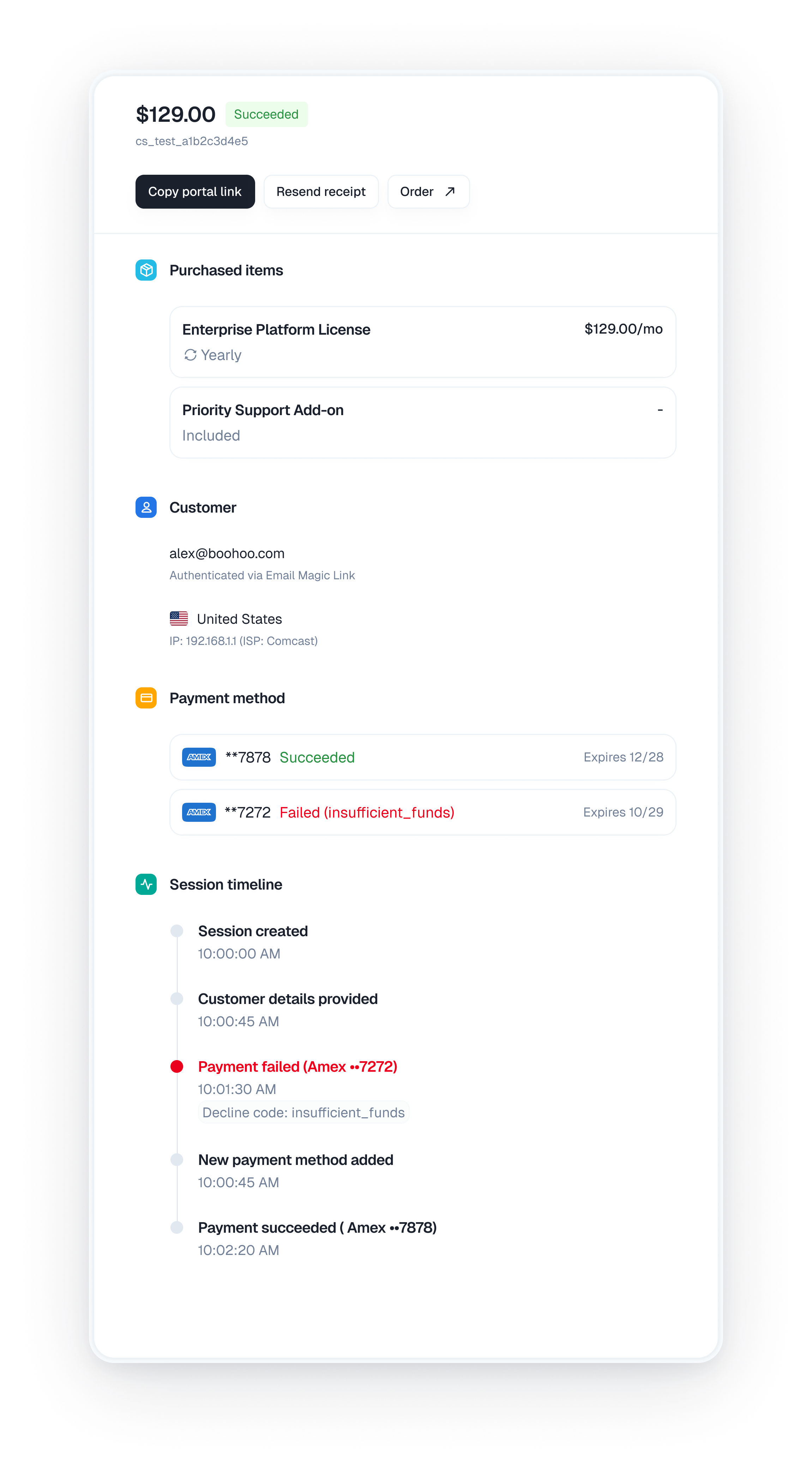
### Monitoring Checkouts
View checkout sessions in the dashboard:
```
Customer at checkout:
1. Select plan and period
2. (Optional) Enter discount code
3. See adjusted price
4. Complete payment
```
Discount codes are applied automatically if the customer enters a valid code.
### Tax Collection
Kelviq can collect and handle taxes:
**Tax ID Collection:**
* Customers can enter their tax ID (VAT number, EIN, etc.)
* Used to determine applicable taxes
* Required for some jurisdictions
**Configuration:**
* Enable/disable tax collection per product
* Taxes are calculated based on customer location and tax ID
### Country Restrictions
Restrict plans to specific countries:
```
Plan: Premium Tier
├─ Available countries: US, UK, CA, AU
├─ Restricted countries: China, Russia
└─ Checkout effect: Plan hidden for customers in restricted countries
```
## Checkout Session Lifecycle
Checkout sessions track the state of each checkout attempt:
### Session States
```
open
├─ Customer is in checkout
├─ No payment yet
└─ Session expires after 24 hours
↓
success
├─ Payment completed
├─ Customer created (if new)
├─ Subscription created
└─ Files and licenses delivered
OR
closed
├─ Customer abandoned checkout
├─ No payment processed
├─ Customer can restart
└─ Session expired
```
### Monitoring Checkouts
View checkout sessions in the dashboard:
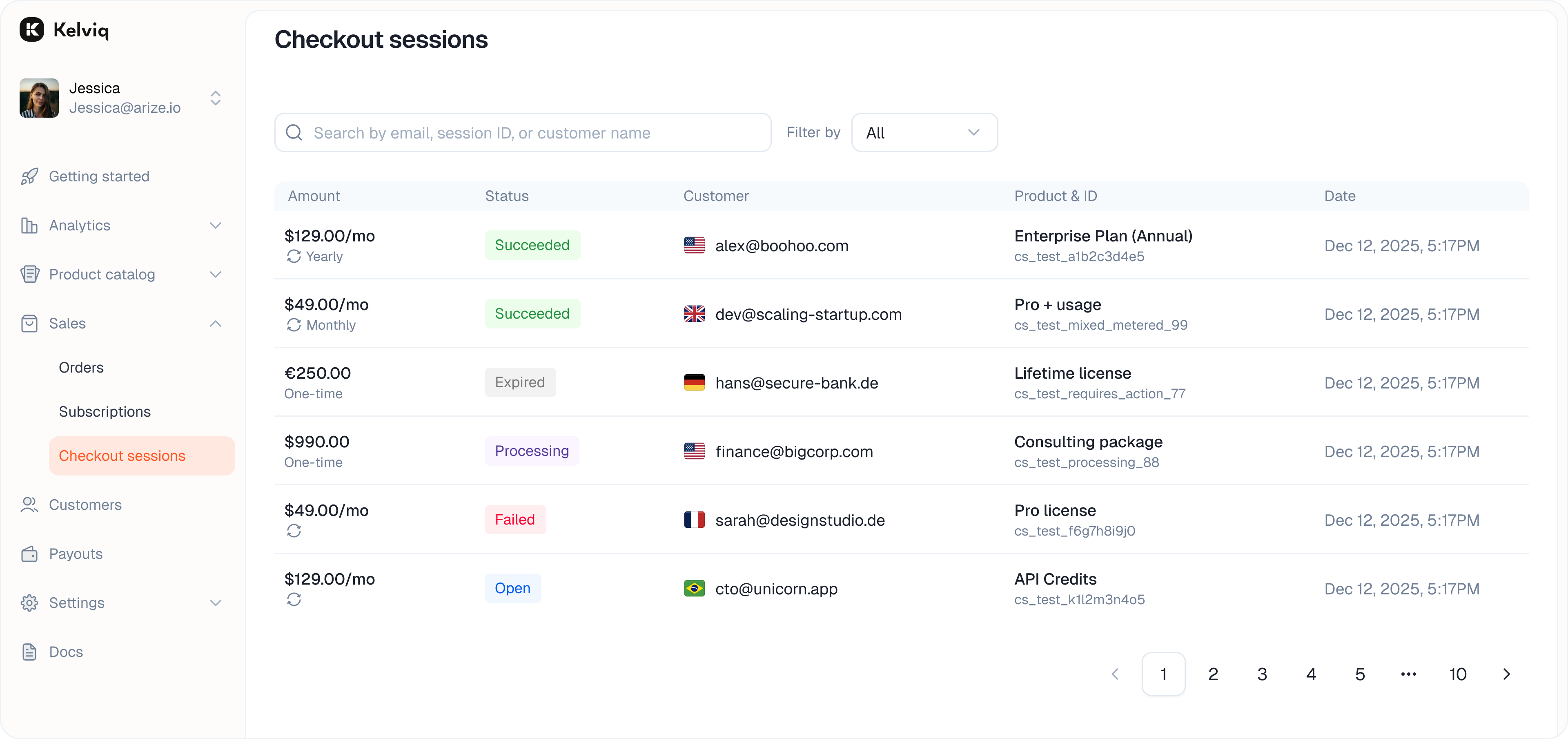 1. **Go to Sales** → Checkout sessions
2. **View sessions** → See all active and completed checkouts
3. **Filter by status** → Open, Success, Closed, Expired
4. **Conversion metrics** → Track conversion rates
1. **Go to Sales** → Checkout sessions
2. **View sessions** → See all active and completed checkouts
3. **Filter by status** → Open, Success, Closed, Expired
4. **Conversion metrics** → Track conversion rates
 ### Create Checkout Sessions via API
You can programmatically create checkout sessions using the SDK:
```python theme={null}
from kelviq_sdk import Kelviq
client = Kelviq.create_sync_client(access_token="your_server_api_key")
# Create a checkout session
response = client.checkout.create_session(
planIdentifier="plan-pro-monthly",
chargePeriod="MONTHLY",
customerId="cust_123",
successUrl="https://yoursite.com/checkout/success"
)
print(f"Checkout URL: {response.checkoutUrl}")
print(f"Session ID: {response.checkoutSessionId}")
```
```typescript theme={null}
import { Kelviq, CHARGE_PERIOD_CHOICES } from '@kelviq/node-sdk';
const client = new Kelviq({ accessToken: 'your_server_api_key' });
// Create a checkout session
const response = await client.checkout.createSession({
planIdentifier: "plan-pro-monthly",
chargePeriod: CHARGE_PERIOD_CHOICES.MONTHLY,
customerId: "cust_123",
successUrl: "https://yoursite.com/checkout/success"
});
console.log(`Checkout URL: ${response.checkoutUrl}`);
console.log(`Session ID: ${response.checkoutSessionId}`);
```
## Checkout Flow Examples
### Example 1: Simple Product
One plan, one price:
```
Product: My Course
├─ Plan: Full Access ($49)
└─ Billing: One-time payment
Link: ?enabled=full_access&plan_identifier=full_access&charge_period=one_time
```
### Example 2: Tiered Plans
Multiple plans, multiple billing periods:
```
Product: Pro Templates
├─ Plan 1: Starter ($9/month or $90/year)
├─ Plan 2: Professional ($29/month or $290/year)
└─ Plan 3: Enterprise (Custom pricing)
Link: ?enabled=starter,pro,enterprise
&plan_identifier=pro
&charge_period=monthly
```
### Example 3: Free + Paid
Offer free plan with paid upgrades:
```
Product: Productivity App
├─ Plan 1: Free (no payment)
└─ Plan 2: Premium ($9.99/month with 30-day trial)
Link: ?enabled=free,premium
&plan_identifier=free
&charge_period=monthly
```
## Payment Methods
Kelviq uses **Stripe** as its payment processor. Stripe supports:
* **Credit/Debit Cards** - Visa, Mastercard, American Express, Discover
* **Digital Wallets** - Apple Pay, Google Pay
* **Bank Transfers** - ACH, SEPA, etc. (regional)
* **Local Methods** - iDEAL, Bancontact, Giropay, EPS (regional)
Customers select their preferred payment method at checkout.
Payment method availability depends on customer location and Stripe's local support. Cards are universally supported.
## Currency & Localization
### Multi-Currency Support
Prices are stored per currency. When customers checkout:
```
Customer from EU viewing checkout:
- Product prices shown in EUR
- Customer sees "29,99 EUR"
Customer from US viewing same product:
- Product prices shown in USD
- Customer sees "$29.99"
```
### Pricing Configuration
Set prices for each currency you support:
```
Plan: Pro
├─ USD: $29/month
├─ EUR: €27/month
├─ GBP: £25/month
└─ AUD: A$45/month
```
### Regional Pricing
Offer different prices based on customer location (PPP - Purchasing Power Parity):
```
Plan: Professional ($29 in US)
├─ India: ₹599 (auto-adjusted for PPP)
├─ Brazil: R$99
└─ US: $29
```
## Testing Checkout
### Sandbox Testing
Test checkouts without processing real payments:
1. **Use Stripe test cards** → Use 4242 4242 4242 4242
2. **Test various scenarios** → Successful payment, declined card, etc.
3. **Monitor test checkouts** → View in your dashboard
### Test Card Examples
| Card | Result |
| ------------------- | ----------------------- |
| 4242 4242 4242 4242 | Successful payment |
| 4000 0000 0000 0002 | Card declined |
| 4000 0025 0000 3155 | Requires authentication |
### Create Checkout Sessions via API
You can programmatically create checkout sessions using the SDK:
```python theme={null}
from kelviq_sdk import Kelviq
client = Kelviq.create_sync_client(access_token="your_server_api_key")
# Create a checkout session
response = client.checkout.create_session(
planIdentifier="plan-pro-monthly",
chargePeriod="MONTHLY",
customerId="cust_123",
successUrl="https://yoursite.com/checkout/success"
)
print(f"Checkout URL: {response.checkoutUrl}")
print(f"Session ID: {response.checkoutSessionId}")
```
```typescript theme={null}
import { Kelviq, CHARGE_PERIOD_CHOICES } from '@kelviq/node-sdk';
const client = new Kelviq({ accessToken: 'your_server_api_key' });
// Create a checkout session
const response = await client.checkout.createSession({
planIdentifier: "plan-pro-monthly",
chargePeriod: CHARGE_PERIOD_CHOICES.MONTHLY,
customerId: "cust_123",
successUrl: "https://yoursite.com/checkout/success"
});
console.log(`Checkout URL: ${response.checkoutUrl}`);
console.log(`Session ID: ${response.checkoutSessionId}`);
```
## Checkout Flow Examples
### Example 1: Simple Product
One plan, one price:
```
Product: My Course
├─ Plan: Full Access ($49)
└─ Billing: One-time payment
Link: ?enabled=full_access&plan_identifier=full_access&charge_period=one_time
```
### Example 2: Tiered Plans
Multiple plans, multiple billing periods:
```
Product: Pro Templates
├─ Plan 1: Starter ($9/month or $90/year)
├─ Plan 2: Professional ($29/month or $290/year)
└─ Plan 3: Enterprise (Custom pricing)
Link: ?enabled=starter,pro,enterprise
&plan_identifier=pro
&charge_period=monthly
```
### Example 3: Free + Paid
Offer free plan with paid upgrades:
```
Product: Productivity App
├─ Plan 1: Free (no payment)
└─ Plan 2: Premium ($9.99/month with 30-day trial)
Link: ?enabled=free,premium
&plan_identifier=free
&charge_period=monthly
```
## Payment Methods
Kelviq uses **Stripe** as its payment processor. Stripe supports:
* **Credit/Debit Cards** - Visa, Mastercard, American Express, Discover
* **Digital Wallets** - Apple Pay, Google Pay
* **Bank Transfers** - ACH, SEPA, etc. (regional)
* **Local Methods** - iDEAL, Bancontact, Giropay, EPS (regional)
Customers select their preferred payment method at checkout.
Payment method availability depends on customer location and Stripe's local support. Cards are universally supported.
## Currency & Localization
### Multi-Currency Support
Prices are stored per currency. When customers checkout:
```
Customer from EU viewing checkout:
- Product prices shown in EUR
- Customer sees "29,99 EUR"
Customer from US viewing same product:
- Product prices shown in USD
- Customer sees "$29.99"
```
### Pricing Configuration
Set prices for each currency you support:
```
Plan: Pro
├─ USD: $29/month
├─ EUR: €27/month
├─ GBP: £25/month
└─ AUD: A$45/month
```
### Regional Pricing
Offer different prices based on customer location (PPP - Purchasing Power Parity):
```
Plan: Professional ($29 in US)
├─ India: ₹599 (auto-adjusted for PPP)
├─ Brazil: R$99
└─ US: $29
```
## Testing Checkout
### Sandbox Testing
Test checkouts without processing real payments:
1. **Use Stripe test cards** → Use 4242 4242 4242 4242
2. **Test various scenarios** → Successful payment, declined card, etc.
3. **Monitor test checkouts** → View in your dashboard
### Test Card Examples
| Card | Result |
| ------------------- | ----------------------- |
| 4242 4242 4242 4242 | Successful payment |
| 4000 0000 0000 0002 | Card declined |
| 4000 0025 0000 3155 | Requires authentication |