> ## Documentation Index
> Fetch the complete documentation index at: https://docs.kelviq.com/llms.txt
> Use this file to discover all available pages before exploring further.
# Transactions
> Audit individual payments, fees, and net earnings
The **Transactions** tab provides a granular breakdown of every single movement of money. This includes successful payments, refunds, and failures.
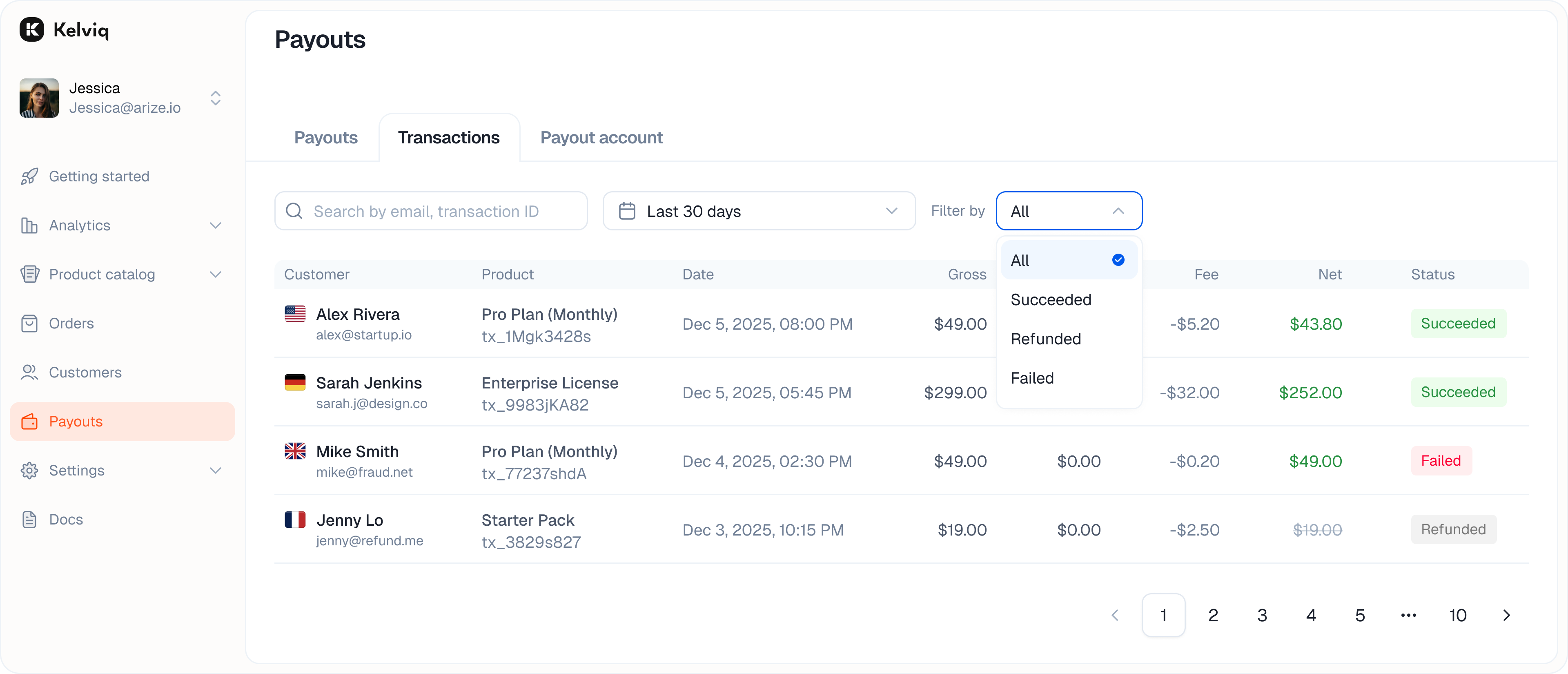 ## Filtering
You can filter the list to find specific issues.
* **Success:** Completed payments.
* **Refunded:** Money returned to customers.
* **Failed:** Declined cards or failed transfers.
## Transaction details
Click on any transaction row to open the details view. This breaks down the math so you know exactly what you earned from that specific order.
* **Gross total:** The amount the customer paid.
* **Processing fees:** The platform and gateway fees deducted.
* **Net earnings:** The final amount added to your balance.
* **Payment details:** The card or method used.
## Filtering
You can filter the list to find specific issues.
* **Success:** Completed payments.
* **Refunded:** Money returned to customers.
* **Failed:** Declined cards or failed transfers.
## Transaction details
Click on any transaction row to open the details view. This breaks down the math so you know exactly what you earned from that specific order.
* **Gross total:** The amount the customer paid.
* **Processing fees:** The platform and gateway fees deducted.
* **Net earnings:** The final amount added to your balance.
* **Payment details:** The card or method used.