> ## Documentation Index
> Fetch the complete documentation index at: https://docs.kelviq.com/llms.txt
> Use this file to discover all available pages before exploring further.
# Discounts
> Create coupons and promotional codes
You can manage all your coupons from the **Product Catalog**.
Navigate to **Product Catalog > Discounts** to see a list of every active and expired code. You can create two types of discounts:
* **Percentage:** A relative cut (e.g. 20% off).
* **Fixed amount:** A specific dollar value (e.g. \$10 off).
## Create a discount
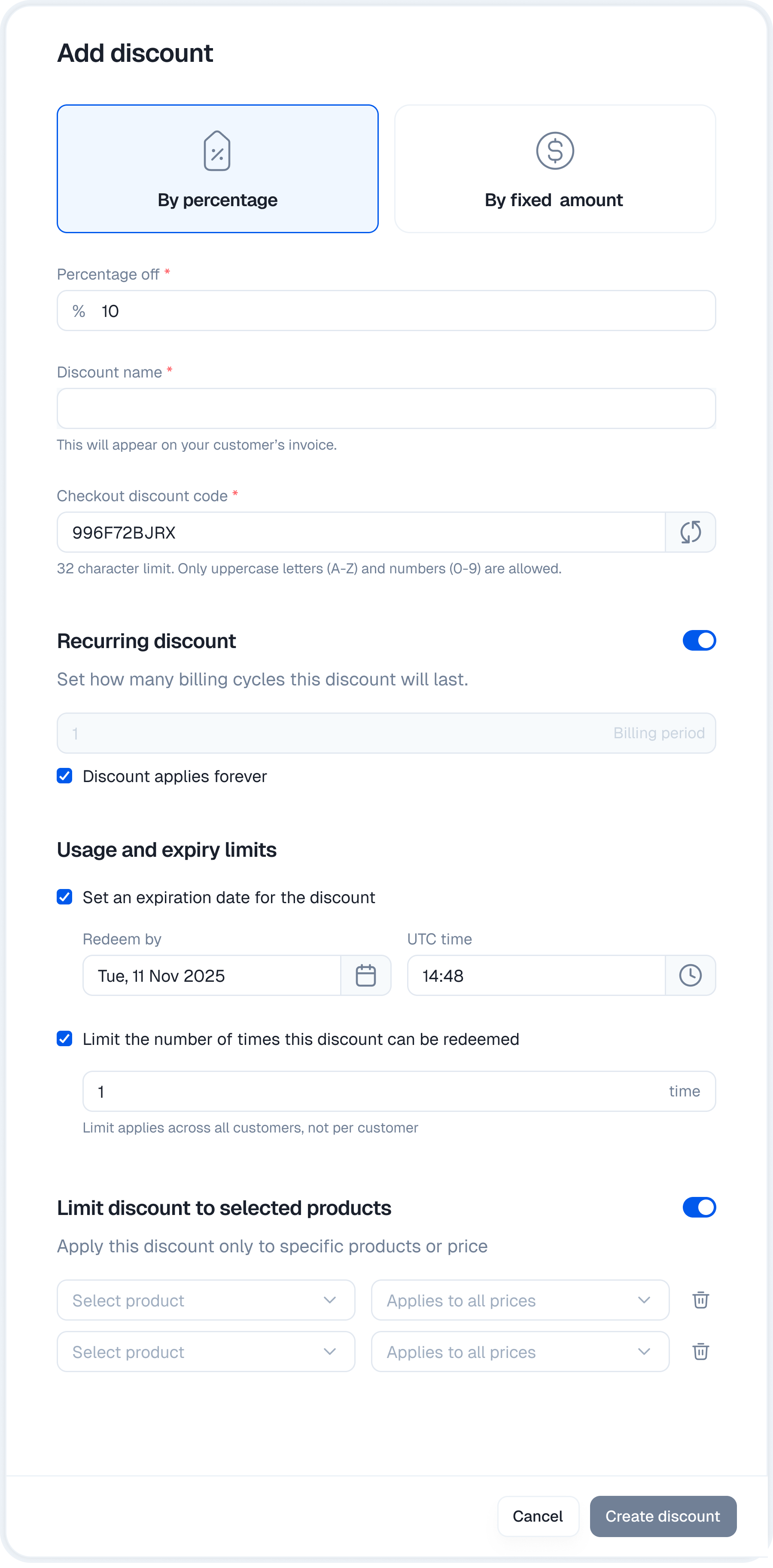
Click **+ Create discount** in the top right corner.
Choose the discount type (Percentage or Fixed amount) and enter the value.
* **Name:** The internal name for your reference.
* **Discount code:** The text the customer enters at checkout. You can type your own or click the **refresh icon** to auto-generate a secure random code.
Set the duration, limits, and product scope (detailed below).
Click **Create discount** to make the code live immediately.
 ## Configuration options
You can control exactly how and when a discount applies.
### Duration
For recurring subscriptions, you define how long the discount lasts.
* **Once:** Applies only to the first invoice.
* **Forever:** Applies to every invoice indefinitely.
* **Repeating:** Applies for a specific number of billing cycles (e.g. "3 months off").
### Usage & expiry
Control the scarcity of the coupon.
* **Redemption limit:** Set a total number of times this code can be used (e.g. "First 100 users").
* **Expiry date:** Set a hard deadline when the code stops working.
### Product restrictions
By default, a discount applies to your entire catalog. You can restrict it to specific items.
1. Toggle **Limit discount on selected products**.
2. Select the products you want to include.
3. **Refine scope:** You can go even deeper by selecting specific price points.
* *Example:* Apply the discount only to the "Pro Plan - Yearly" interval, while excluding the "Monthly" version.
## Management
The main discounts tab shows the status of every code you have created.
## Configuration options
You can control exactly how and when a discount applies.
### Duration
For recurring subscriptions, you define how long the discount lasts.
* **Once:** Applies only to the first invoice.
* **Forever:** Applies to every invoice indefinitely.
* **Repeating:** Applies for a specific number of billing cycles (e.g. "3 months off").
### Usage & expiry
Control the scarcity of the coupon.
* **Redemption limit:** Set a total number of times this code can be used (e.g. "First 100 users").
* **Expiry date:** Set a hard deadline when the code stops working.
### Product restrictions
By default, a discount applies to your entire catalog. You can restrict it to specific items.
1. Toggle **Limit discount on selected products**.
2. Select the products you want to include.
3. **Refine scope:** You can go even deeper by selecting specific price points.
* *Example:* Apply the discount only to the "Pro Plan - Yearly" interval, while excluding the "Monthly" version.
## Management
The main discounts tab shows the status of every code you have created.
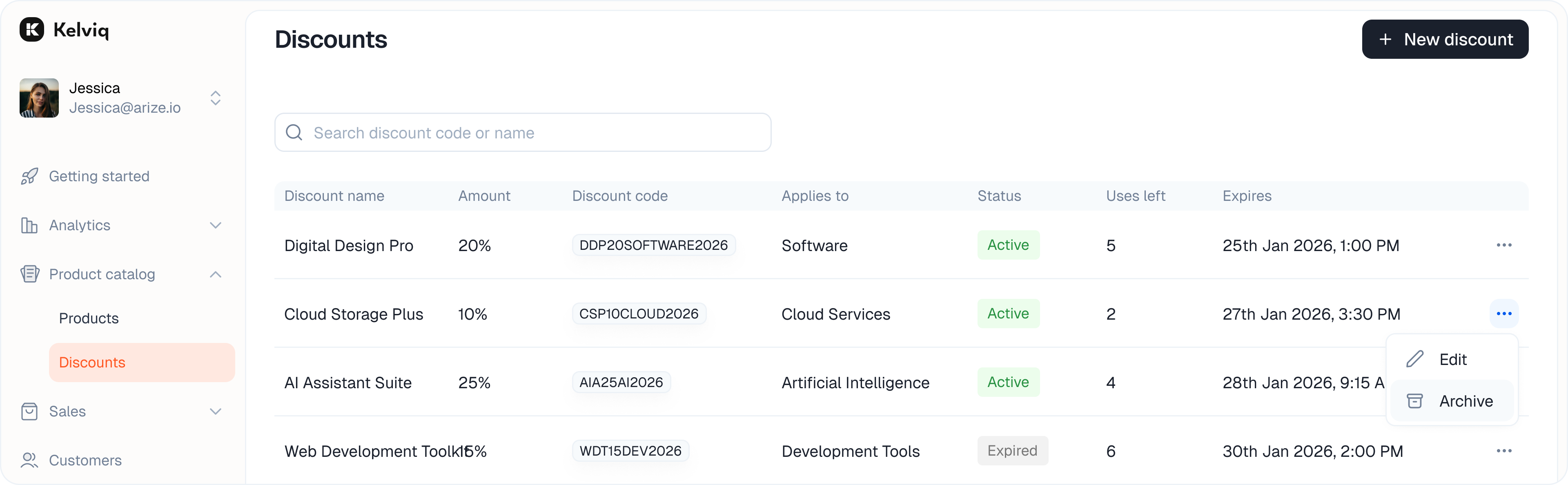 * **Active:** The code is live and redeemable.
* **Expired:** The code has passed its end date or hit its usage limit.
* **Active:** The code is live and redeemable.
* **Expired:** The code has passed its end date or hit its usage limit.