> ## Documentation Index
> Fetch the complete documentation index at: https://docs.kelviq.com/llms.txt
> Use this file to discover all available pages before exploring further.
# Pay as you go
> Bill customers each month for the usage they record
With pay as you go, the customer does not buy a block of usage upfront. Your backend reports what they consume, and Kelviq bills the resulting amount at the end of the monthly subscription period. Use it for API calls, AI tokens, storage, compute time, or any other metered cost.
The same plan can contain a monthly base price and one or more usage charges. You define the billable feature and its rates in the dashboard; your application supplies the usage.
Monthly must be the plan's only billing period. Pay as you go cannot be used on a plan that also offers yearly, quarterly, one-time, or another billing period.
## Before you start
You will need:
* A product and a plan in Kelviq
* A [Meter feature](/product-catalog/create-a-feature), such as `api-calls` or `tokens`
* A monthly price on the plan
* A server API key for the same environment as the plan
Pay as you go supports **Flat**, **Package**, **Tiered**, and **Volume** pricing. It does not support **Stair-step** pricing.
## Configure the plan
1. Open the product and edit its plan.
2. In the plan's billing periods, keep **Monthly** enabled and turn off every other period.
3. Open **Usage charges** and select the metered feature you want to bill for. If the list is empty, [create a Meter feature](/product-catalog/create-a-feature) from **Product catalog → Features** first.
4. For **Billing model**, choose **Pay-as-you-go**.
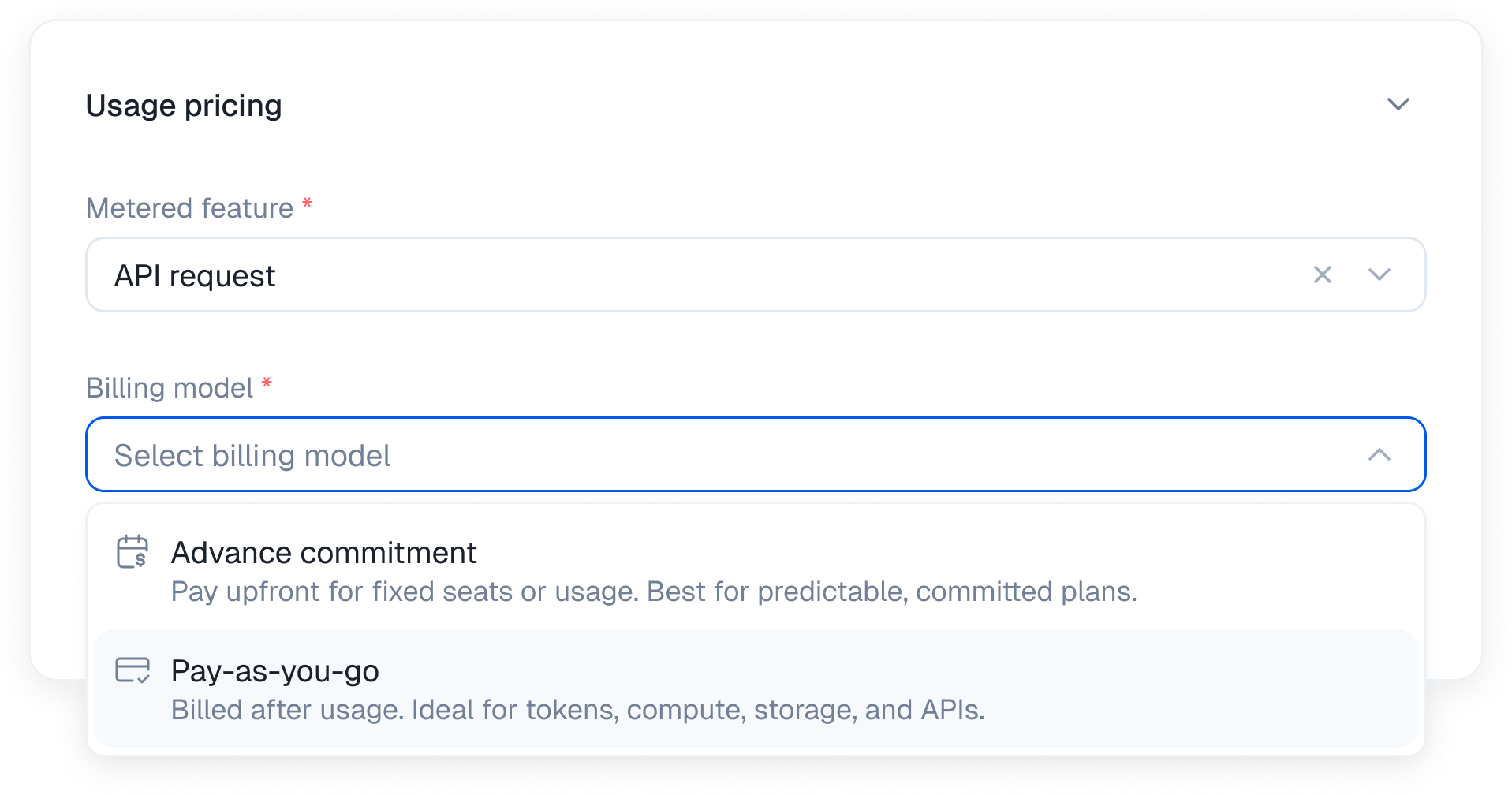 5. Choose a pricing model and enter its rates.
6. Add [usage alerts](/product-catalog/usage-alerts) if you want to notify your application when usage crosses a threshold.
7. Save the plan. If you edited a published plan, publish the new version before testing it.
When you select Pay as you go, Kelviq keeps Monthly as the plan's only billing period. Usage reset and credit rollover controls are removed because there is no prepaid balance to reset or carry into the next period.
## Choose a pricing model
The billing model controls *when* the customer pays. The pricing model controls *how* Kelviq calculates the charge.
| Pricing model | How it bills | Example |
| ------------- | ------------------------------------------------------------------ | ----------------------------------------------------------- |
| Flat | Uses one rate for every unit | \$0.001 per API call |
| Package | Bills in blocks of units | \$2 per 10,000 tokens |
| Tiered | Applies each rate only to the units inside that tier | First 100,000 tokens free, then \$0.0002 per token |
| Volume | Uses the rate for the customer's final usage band across all units | $0.01 per request, or $0.007 for all requests after 100,000 |
See [Usage based pricing](/product-catalog/usage-based-billing) for the full calculation rules and examples for each model.
### Combine a base price with usage
You can charge a fixed monthly subscription and add usage on top. For example:
```text theme={null}
Base subscription: $20 per month
Included usage: 100,000 tokens
Additional usage: $0.0002 per token
```
If the customer uses 120,000 tokens, the first 100,000 fall into a zero-priced tier. The remaining 20,000 tokens cost $4, so the period total is $24 before tax.
## Report usage from your backend
Kelviq can only bill usage that your application reports. Send usage from trusted server-side code after the billable action succeeds. Do not expose a server API key in browser or mobile code.
### Node.js
Use `DELTA` when each call adds to the current meter:
```ts theme={null}
import { BEHAVIOUR_CHOICES, Kelviq } from "@kelviq/node-sdk";
const client = new Kelviq({
accessToken: process.env.KELVIQ_SERVER_API_KEY!,
});
await client.reporting.reportUsage({
customerId: "customer_001",
featureId: "api-calls",
value: 1,
behaviour: BEHAVIOUR_CHOICES.DELTA,
});
```
Use `SET` when you already maintain a cumulative total and want Kelviq's meter to match it:
```ts theme={null}
await client.reporting.reportUsage({
customerId: "customer_001",
featureId: "api-calls",
value: 1250,
behaviour: BEHAVIOUR_CHOICES.SET,
});
```
| Field | What to send |
| ------------ | ---------------------------------------------------------- |
| `customerId` | The same customer identifier used for the subscription |
| `featureId` | The identifier of the metered feature on the plan |
| `value` | A whole-number usage quantity |
| `behaviour` | `DELTA` to add usage or `SET` to replace the current value |
A repeated `DELTA` call adds the value again. Make sure retries do not submit the same unit of work twice. If your system periodically sends an authoritative running total, use `SET` instead.
### REST API
You can send the same update without an SDK:
```bash theme={null}
curl --request POST \
--url https://api.kelviq.com/api/v1/report/usage/ \
--header "Authorization: Bearer $KELVIQ_SERVER_API_KEY" \
--header "Content-Type: application/json" \
--data '{
"customerId": "customer_001",
"featureId": "api-calls",
"value": 1,
"behaviour": "DELTA"
}'
```
See [Report pre-aggregated usage](/api-reference/reporting/report-pre-aggregated-usage) for the request and response schema.
## How billing works
1. The customer starts a monthly subscription.
2. Your backend reports usage throughout the period.
3. Kelviq updates the meter whenever it receives a valid report.
4. At the end of the subscription period, Kelviq applies the configured pricing rules to the final usage.
5. The meter starts a new monthly period on the customer's subscription renewal date.
Reporting usage does not charge the customer immediately. It updates the quantity Kelviq will use for the period's bill.
## Add alerts without stopping usage
Usage alerts are optional, but they are useful when a bill can grow during the month. You can set absolute thresholds for a pay-as-you-go feature, then handle the `feature.usage_alert` webhook to send an email, show an in-app warning, or suggest a different plan.
You do not need a separate pay-as-you-go webhook to calculate the bill. Usage reports drive the meter; alerts only notify your application when a threshold is crossed.
See [Usage alerts](/product-catalog/usage-alerts) for configuration and webhook examples.
## Test in sandbox
Sandbox and production have separate products, customers, subscriptions, and API keys. To test the complete flow:
1. Switch the dashboard to Sandbox.
2. Create or publish a monthly plan with a pay-as-you-go charge.
3. Complete a test checkout so the sandbox customer has an active subscription.
4. Initialize the Node SDK with `environment: "sandbox"`, or send REST requests to `https://sandboxapi.kelviq.com/api/v1`.
5. Report a small usage value.
6. Open the customer's metered entitlement and confirm that the recorded usage changed as expected.
See [Sandbox](/guides/sandbox) for environment setup and test-payment details.
## Troubleshooting
### Pay as you go shows a billing-period error
Remove every billing period except Monthly. A plan with both Monthly and Yearly pricing is not eligible, even if you only enter a usage rate under Monthly.
### Stair-step cannot be selected
Stair-step pricing is not available with Pay as you go. Choose Flat, Package, Tiered, or Volume. If you need fixed usage bands, use an advance commitment instead.
### Reported usage does not appear
Check that the API key, customer, plan, and feature all belong to the same environment. Also confirm that `customerId` and `featureId` exactly match the identifiers in Kelviq.
### Usage is too high
Look for duplicate `DELTA` calls or a mismatch between the unit your code reports and the unit your price expects. For package pricing, remember that a partially used package is billed as a complete package.
### Credit rollover is missing
This is expected. Rollover applies to unused advance-commitment credits, not usage billed after the period ends.
5. Choose a pricing model and enter its rates.
6. Add [usage alerts](/product-catalog/usage-alerts) if you want to notify your application when usage crosses a threshold.
7. Save the plan. If you edited a published plan, publish the new version before testing it.
When you select Pay as you go, Kelviq keeps Monthly as the plan's only billing period. Usage reset and credit rollover controls are removed because there is no prepaid balance to reset or carry into the next period.
## Choose a pricing model
The billing model controls *when* the customer pays. The pricing model controls *how* Kelviq calculates the charge.
| Pricing model | How it bills | Example |
| ------------- | ------------------------------------------------------------------ | ----------------------------------------------------------- |
| Flat | Uses one rate for every unit | \$0.001 per API call |
| Package | Bills in blocks of units | \$2 per 10,000 tokens |
| Tiered | Applies each rate only to the units inside that tier | First 100,000 tokens free, then \$0.0002 per token |
| Volume | Uses the rate for the customer's final usage band across all units | $0.01 per request, or $0.007 for all requests after 100,000 |
See [Usage based pricing](/product-catalog/usage-based-billing) for the full calculation rules and examples for each model.
### Combine a base price with usage
You can charge a fixed monthly subscription and add usage on top. For example:
```text theme={null}
Base subscription: $20 per month
Included usage: 100,000 tokens
Additional usage: $0.0002 per token
```
If the customer uses 120,000 tokens, the first 100,000 fall into a zero-priced tier. The remaining 20,000 tokens cost $4, so the period total is $24 before tax.
## Report usage from your backend
Kelviq can only bill usage that your application reports. Send usage from trusted server-side code after the billable action succeeds. Do not expose a server API key in browser or mobile code.
### Node.js
Use `DELTA` when each call adds to the current meter:
```ts theme={null}
import { BEHAVIOUR_CHOICES, Kelviq } from "@kelviq/node-sdk";
const client = new Kelviq({
accessToken: process.env.KELVIQ_SERVER_API_KEY!,
});
await client.reporting.reportUsage({
customerId: "customer_001",
featureId: "api-calls",
value: 1,
behaviour: BEHAVIOUR_CHOICES.DELTA,
});
```
Use `SET` when you already maintain a cumulative total and want Kelviq's meter to match it:
```ts theme={null}
await client.reporting.reportUsage({
customerId: "customer_001",
featureId: "api-calls",
value: 1250,
behaviour: BEHAVIOUR_CHOICES.SET,
});
```
| Field | What to send |
| ------------ | ---------------------------------------------------------- |
| `customerId` | The same customer identifier used for the subscription |
| `featureId` | The identifier of the metered feature on the plan |
| `value` | A whole-number usage quantity |
| `behaviour` | `DELTA` to add usage or `SET` to replace the current value |
A repeated `DELTA` call adds the value again. Make sure retries do not submit the same unit of work twice. If your system periodically sends an authoritative running total, use `SET` instead.
### REST API
You can send the same update without an SDK:
```bash theme={null}
curl --request POST \
--url https://api.kelviq.com/api/v1/report/usage/ \
--header "Authorization: Bearer $KELVIQ_SERVER_API_KEY" \
--header "Content-Type: application/json" \
--data '{
"customerId": "customer_001",
"featureId": "api-calls",
"value": 1,
"behaviour": "DELTA"
}'
```
See [Report pre-aggregated usage](/api-reference/reporting/report-pre-aggregated-usage) for the request and response schema.
## How billing works
1. The customer starts a monthly subscription.
2. Your backend reports usage throughout the period.
3. Kelviq updates the meter whenever it receives a valid report.
4. At the end of the subscription period, Kelviq applies the configured pricing rules to the final usage.
5. The meter starts a new monthly period on the customer's subscription renewal date.
Reporting usage does not charge the customer immediately. It updates the quantity Kelviq will use for the period's bill.
## Add alerts without stopping usage
Usage alerts are optional, but they are useful when a bill can grow during the month. You can set absolute thresholds for a pay-as-you-go feature, then handle the `feature.usage_alert` webhook to send an email, show an in-app warning, or suggest a different plan.
You do not need a separate pay-as-you-go webhook to calculate the bill. Usage reports drive the meter; alerts only notify your application when a threshold is crossed.
See [Usage alerts](/product-catalog/usage-alerts) for configuration and webhook examples.
## Test in sandbox
Sandbox and production have separate products, customers, subscriptions, and API keys. To test the complete flow:
1. Switch the dashboard to Sandbox.
2. Create or publish a monthly plan with a pay-as-you-go charge.
3. Complete a test checkout so the sandbox customer has an active subscription.
4. Initialize the Node SDK with `environment: "sandbox"`, or send REST requests to `https://sandboxapi.kelviq.com/api/v1`.
5. Report a small usage value.
6. Open the customer's metered entitlement and confirm that the recorded usage changed as expected.
See [Sandbox](/guides/sandbox) for environment setup and test-payment details.
## Troubleshooting
### Pay as you go shows a billing-period error
Remove every billing period except Monthly. A plan with both Monthly and Yearly pricing is not eligible, even if you only enter a usage rate under Monthly.
### Stair-step cannot be selected
Stair-step pricing is not available with Pay as you go. Choose Flat, Package, Tiered, or Volume. If you need fixed usage bands, use an advance commitment instead.
### Reported usage does not appear
Check that the API key, customer, plan, and feature all belong to the same environment. Also confirm that `customerId` and `featureId` exactly match the identifiers in Kelviq.
### Usage is too high
Look for duplicate `DELTA` calls or a mismatch between the unit your code reports and the unit your price expects. For package pricing, remember that a partially used package is billed as a complete package.
### Credit rollover is missing
This is expected. Rollover applies to unused advance-commitment credits, not usage billed after the period ends.