> ## Documentation Index
> Fetch the complete documentation index at: https://docs.kelviq.com/llms.txt
> Use this file to discover all available pages before exploring further.
# Usage alerts
> Configure usage thresholds and receive feature.usage_alert webhooks
Usage alerts tell your application when a customer's metered feature crosses a threshold. Use them with any meter feature, such as API calls, credits, tokens, or storage.
A usage alert has two parts. You configure the threshold on the plan, then receive the `feature.usage_alert` event through a webhook. Turning on the alert does not email the customer or show an in-app message by itself. Your webhook handler decides what happens next.
## How usage alerts work
1. Your application reports usage to Kelviq with `SET` or `DELTA` behavior.
2. Kelviq updates the customer's meter for the current usage period.
3. When current usage crosses a configured threshold, Kelviq creates a `feature.usage_alert` event.
4. Kelviq sends the event to webhook endpoints subscribed to that event type.
5. Your application can send an email, show an in-app warning, notify a support team, or offer an upgrade.
Usage alerts do not stop usage, change a price, or charge the customer. Use a hard limit to stop usage at zero balance, and configure usage pricing when customers should pay for additional consumption.
## Choose a threshold type
Kelviq supports percentage and absolute-unit thresholds.
| Dashboard option | API value | When it triggers | Valid values |
| ---------------- | ------------ | --------------------------------------------------------------- | ------------------------------------- |
| Percentage | `PERCENTAGE` | Current usage reaches a percentage of the feature's usage limit | 1–100 |
| Balance | `BALANCE` | Current usage reaches an absolute number of feature units | Any number greater than or equal to 1 |
Suppose a plan includes 10,000 API calls each month:
* A 75% percentage threshold is crossed when current usage reaches 7,500 calls.
* A balance threshold of 7,500 is crossed at the same usage count, but it is stored as an absolute number of calls rather than a percentage.
Percentage thresholds are easier to reuse across plans with different limits. Balance thresholds are useful when the absolute number matters, such as 10,000 API calls or 1,000 AI credits.
You can add more than one threshold. For example, use 75% for an early warning and 90% for a stronger upgrade or top-up prompt.
## Configure usage alerts in the dashboard
1. Open **Product Catalog → Products** and select the product.
2. Open the plan that contains the metered feature.
3. Edit **Usage pricing** or open **Manage features & limits**.
4. Select the meter feature and enter its usage value or pricing configuration.
5. Turn on **Usage alert**.
6. Choose **Percentage** or **Balance** as the threshold type.
7. Click **Add threshold** and enter each threshold.
8. Save the configuration. If Kelviq creates a draft version of a published plan, publish the draft before testing it.
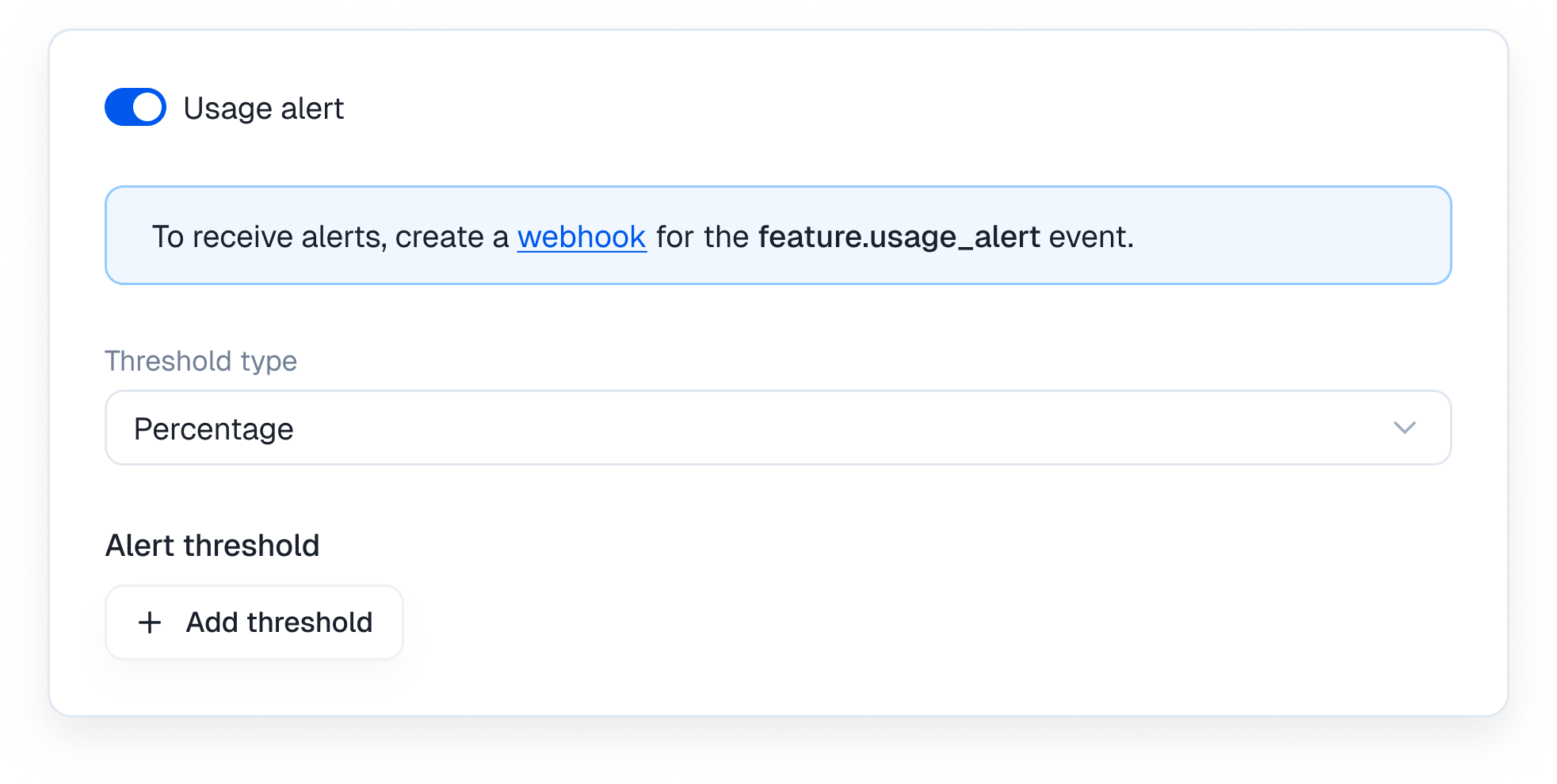 If the Usage alert switch is disabled while managing an entitlement, make sure you selected a meter feature and entered a value. Percentage alerts also need a finite usage limit so Kelviq can calculate the percentage used.
Regional prices inherit usage alerts from the base price. Change the base price when the same alert configuration should apply to every regional price.
## Configure usage alerts through the API
To update one plan entitlement, send a `PATCH` request to:
```text theme={null}
/api/v1/catalog/plans/{plan_identifier}/features/{feature_identifier}/
```
`feature_identifier` is the feature's identifier, such as `api-calls`, not its UUID.
```bash theme={null}
curl --request PATCH \
--url https://api.kelviq.com/api/v1/catalog/plans/pro/features/api-calls/ \
--header "Authorization: Bearer $KELVIQ_SERVER_API_KEY" \
--header "Content-Type: application/json" \
--data '{
"details": {
"value": 10000,
"hasUnlimitedUsage": false,
"reset": "EVERY_MONTH",
"resetTime": "BEGINNING_OF_PERIOD",
"usageAlerts": {
"enabled": true,
"thresholds": [75, 90],
"thresholdType": "PERCENTAGE"
},
"hardLimit": false
}
}'
```
The `usageAlerts` object contains:
| Field | Type | Description |
| --------------- | --------- | ------------------------------------------ |
| `enabled` | boolean | Turns alerts on or off for the entitlement |
| `thresholds` | number\[] | Percentage or unit values to watch |
| `thresholdType` | string | `PERCENTAGE` or `BALANCE` |
Updating a published plan creates a new draft version. Publish that draft before expecting the new thresholds to apply. See [Update plan entitlement](/api-reference/plan-entitlements/update-plan-entitlement) for the complete request schema.
## Create the webhook endpoint
The threshold configuration tells Kelviq when to create an alert. The webhook endpoint is how your application receives it.
1. Open **Settings → Webhooks** in the Kelviq dashboard.
2. Create an endpoint with a public HTTPS URL.
3. Subscribe the endpoint to `feature.usage_alert`.
4. Save the signing secret. Kelviq shows it once.
5. Verify every delivery before reading its data.
The webhook endpoint and usage reports must use the same environment. A production webhook does not receive alerts created from sandbox usage, and a sandbox webhook does not receive production alerts.
See the [Webhooks guide](/guides/webhooks) for signature verification, retries, delivery logs, and manual resends.
## Usage alert payload
The event identifies the customer, feature, usage limit, current usage, threshold, subscription, and usage period.
```json theme={null}
{
"id": "575a1aa4-3414-4e08-b4ad-6bfd3e96322d",
"type": "feature.usage_alert",
"created_at": "2026-05-18T18:48:59Z",
"data": {
"object": {
"id": "a1c88c9d-19cf-48cc-b194-6cc6ebb356ee",
"object": "feature_usage_alert",
"feature": {
"id": "245d745f-28ca-4856-81fe-1e1f5c6c7ebd",
"name": "API calls",
"identifier": "api-calls",
"feature_type": "METER"
},
"customer": {
"id": "d2b6c9ac-bcd5-4e59-8c7e-b6472485e112",
"name": "Geo",
"email": "geo@example.com",
"customer_id": "customer-123"
},
"usage_limit": 10000,
"current_usage": 9000,
"threshold_type": "PERCENTAGE",
"threshold_value": 90,
"period_start_time": "2026-05-01T00:00:00Z",
"period_end_time": "2026-06-01T00:00:00Z",
"subscription_id": "137e4652-5540-4a3b-9bce-fa393b028539",
"organization": "2a3664c0-cbd2-4f1c-a98f-1b4f65e3256c"
}
}
}
```
The fields most alert handlers use are:
| Field | Use |
| -------------------------------------- | ---------------------------------------------------------------- |
| Top-level `id` | Idempotency key for deduplicating webhook deliveries |
| `feature.identifier` | Maps the alert to a feature in your application |
| `customer.customer_id` | Maps the alert to your own user or account |
| `customer.email` | Address for a customer notification, if you choose to send one |
| `usage_limit` | Configured usage allowance |
| `current_usage` | Usage recorded when the event was created |
| `threshold_type` | Whether `threshold_value` is a percentage or absolute unit count |
| `threshold_value` | The configured threshold that was crossed |
| `period_start_time`, `period_end_time` | Usage period associated with the alert |
| `subscription_id` | Subscription that owns the entitlement |
## Handle `feature.usage_alert`
This Express example verifies the request and sends the alert to an application queue. The queue can handle email or in-app notifications outside the webhook request.
```typescript theme={null}
import express from "express";
import {
validateEvent,
WebhookVerificationError,
} from "@kelviq/node-sdk";
const app = express();
app.post(
"/webhooks/kelviq",
express.raw({ type: "application/json" }),
async (req, res) => {
try {
const event = validateEvent(
req.body,
req.headers,
process.env.KELVIQ_WEBHOOK_SECRET!,
);
if (event.type === "feature.usage_alert") {
const alert = event.data.object;
// `notificationQueue` is your own queue or background-job service.
await notificationQueue.add("usage-alert", {
eventId: event.id,
customerId: alert.customer.customer_id,
email: alert.customer.email,
featureId: alert.feature.identifier,
currentUsage: alert.current_usage,
usageLimit: alert.usage_limit,
thresholdType: alert.threshold_type,
thresholdValue: alert.threshold_value,
});
}
return res.sendStatus(202);
} catch (error) {
if (error instanceof WebhookVerificationError) {
return res.sendStatus(403);
}
return res.sendStatus(500);
}
},
);
```
Kelviq may deliver the same event more than once because of automatic retries or a manual resend. Store the top-level event `id` or `webhook-id` header before enqueueing work, and skip the event if you already processed it.
Return a `2xx` response quickly. Do not wait for an email provider or another slow service inside the webhook request.
## Test an alert in sandbox
1. Create a sandbox webhook endpoint subscribed to `feature.usage_alert`.
2. Configure a low threshold on a sandbox plan, such as 1 unit or 1%.
3. Report enough usage to cross the threshold.
4. Open **Settings → Webhooks**, select the endpoint, and inspect the delivery log.
5. Confirm the event's customer, feature, threshold, and usage period.
For example, report a usage increment with the Node SDK:
```typescript theme={null}
import { BEHAVIOUR_CHOICES, Kelviq } from "@kelviq/node-sdk";
const kelviq = new Kelviq({
accessToken: process.env.KELVIQ_SANDBOX_SERVER_API_KEY!,
environment: "sandbox",
});
await kelviq.reporting.reportUsage({
customerId: "customer-123",
featureId: "api-calls",
value: 2,
behaviour: BEHAVIOUR_CHOICES.DELTA,
});
```
If delivery fails, fix the endpoint and use **Resend** from the delivery log. Keep the handler idempotent because a resend can deliver the same event again.
## Troubleshooting
| Problem | What to check |
| ------------------------------------------------ | --------------------------------------------------------------------------------------------------------------------------------- |
| The Usage alert switch is disabled | Confirm that the feature is a meter and has a configured value |
| No webhook arrives | Confirm the endpoint subscribes to `feature.usage_alert`, the plan version is published, and usage crossed a configured threshold |
| Sandbox testing produces no production delivery | Make sure usage reports, plan configuration, API key, and webhook all belong to the same environment |
| Percentage threshold does not match expectations | Compare `current_usage` with `usage_limit`; percentage thresholds measure usage against that limit |
| The handler runs twice | Deduplicate using the event `id` or `webhook-id`; retries and manual resends can duplicate a delivery |
| Customers receive no email | Kelviq emits the webhook event; your application must send the email or in-app notification |
If the Usage alert switch is disabled while managing an entitlement, make sure you selected a meter feature and entered a value. Percentage alerts also need a finite usage limit so Kelviq can calculate the percentage used.
Regional prices inherit usage alerts from the base price. Change the base price when the same alert configuration should apply to every regional price.
## Configure usage alerts through the API
To update one plan entitlement, send a `PATCH` request to:
```text theme={null}
/api/v1/catalog/plans/{plan_identifier}/features/{feature_identifier}/
```
`feature_identifier` is the feature's identifier, such as `api-calls`, not its UUID.
```bash theme={null}
curl --request PATCH \
--url https://api.kelviq.com/api/v1/catalog/plans/pro/features/api-calls/ \
--header "Authorization: Bearer $KELVIQ_SERVER_API_KEY" \
--header "Content-Type: application/json" \
--data '{
"details": {
"value": 10000,
"hasUnlimitedUsage": false,
"reset": "EVERY_MONTH",
"resetTime": "BEGINNING_OF_PERIOD",
"usageAlerts": {
"enabled": true,
"thresholds": [75, 90],
"thresholdType": "PERCENTAGE"
},
"hardLimit": false
}
}'
```
The `usageAlerts` object contains:
| Field | Type | Description |
| --------------- | --------- | ------------------------------------------ |
| `enabled` | boolean | Turns alerts on or off for the entitlement |
| `thresholds` | number\[] | Percentage or unit values to watch |
| `thresholdType` | string | `PERCENTAGE` or `BALANCE` |
Updating a published plan creates a new draft version. Publish that draft before expecting the new thresholds to apply. See [Update plan entitlement](/api-reference/plan-entitlements/update-plan-entitlement) for the complete request schema.
## Create the webhook endpoint
The threshold configuration tells Kelviq when to create an alert. The webhook endpoint is how your application receives it.
1. Open **Settings → Webhooks** in the Kelviq dashboard.
2. Create an endpoint with a public HTTPS URL.
3. Subscribe the endpoint to `feature.usage_alert`.
4. Save the signing secret. Kelviq shows it once.
5. Verify every delivery before reading its data.
The webhook endpoint and usage reports must use the same environment. A production webhook does not receive alerts created from sandbox usage, and a sandbox webhook does not receive production alerts.
See the [Webhooks guide](/guides/webhooks) for signature verification, retries, delivery logs, and manual resends.
## Usage alert payload
The event identifies the customer, feature, usage limit, current usage, threshold, subscription, and usage period.
```json theme={null}
{
"id": "575a1aa4-3414-4e08-b4ad-6bfd3e96322d",
"type": "feature.usage_alert",
"created_at": "2026-05-18T18:48:59Z",
"data": {
"object": {
"id": "a1c88c9d-19cf-48cc-b194-6cc6ebb356ee",
"object": "feature_usage_alert",
"feature": {
"id": "245d745f-28ca-4856-81fe-1e1f5c6c7ebd",
"name": "API calls",
"identifier": "api-calls",
"feature_type": "METER"
},
"customer": {
"id": "d2b6c9ac-bcd5-4e59-8c7e-b6472485e112",
"name": "Geo",
"email": "geo@example.com",
"customer_id": "customer-123"
},
"usage_limit": 10000,
"current_usage": 9000,
"threshold_type": "PERCENTAGE",
"threshold_value": 90,
"period_start_time": "2026-05-01T00:00:00Z",
"period_end_time": "2026-06-01T00:00:00Z",
"subscription_id": "137e4652-5540-4a3b-9bce-fa393b028539",
"organization": "2a3664c0-cbd2-4f1c-a98f-1b4f65e3256c"
}
}
}
```
The fields most alert handlers use are:
| Field | Use |
| -------------------------------------- | ---------------------------------------------------------------- |
| Top-level `id` | Idempotency key for deduplicating webhook deliveries |
| `feature.identifier` | Maps the alert to a feature in your application |
| `customer.customer_id` | Maps the alert to your own user or account |
| `customer.email` | Address for a customer notification, if you choose to send one |
| `usage_limit` | Configured usage allowance |
| `current_usage` | Usage recorded when the event was created |
| `threshold_type` | Whether `threshold_value` is a percentage or absolute unit count |
| `threshold_value` | The configured threshold that was crossed |
| `period_start_time`, `period_end_time` | Usage period associated with the alert |
| `subscription_id` | Subscription that owns the entitlement |
## Handle `feature.usage_alert`
This Express example verifies the request and sends the alert to an application queue. The queue can handle email or in-app notifications outside the webhook request.
```typescript theme={null}
import express from "express";
import {
validateEvent,
WebhookVerificationError,
} from "@kelviq/node-sdk";
const app = express();
app.post(
"/webhooks/kelviq",
express.raw({ type: "application/json" }),
async (req, res) => {
try {
const event = validateEvent(
req.body,
req.headers,
process.env.KELVIQ_WEBHOOK_SECRET!,
);
if (event.type === "feature.usage_alert") {
const alert = event.data.object;
// `notificationQueue` is your own queue or background-job service.
await notificationQueue.add("usage-alert", {
eventId: event.id,
customerId: alert.customer.customer_id,
email: alert.customer.email,
featureId: alert.feature.identifier,
currentUsage: alert.current_usage,
usageLimit: alert.usage_limit,
thresholdType: alert.threshold_type,
thresholdValue: alert.threshold_value,
});
}
return res.sendStatus(202);
} catch (error) {
if (error instanceof WebhookVerificationError) {
return res.sendStatus(403);
}
return res.sendStatus(500);
}
},
);
```
Kelviq may deliver the same event more than once because of automatic retries or a manual resend. Store the top-level event `id` or `webhook-id` header before enqueueing work, and skip the event if you already processed it.
Return a `2xx` response quickly. Do not wait for an email provider or another slow service inside the webhook request.
## Test an alert in sandbox
1. Create a sandbox webhook endpoint subscribed to `feature.usage_alert`.
2. Configure a low threshold on a sandbox plan, such as 1 unit or 1%.
3. Report enough usage to cross the threshold.
4. Open **Settings → Webhooks**, select the endpoint, and inspect the delivery log.
5. Confirm the event's customer, feature, threshold, and usage period.
For example, report a usage increment with the Node SDK:
```typescript theme={null}
import { BEHAVIOUR_CHOICES, Kelviq } from "@kelviq/node-sdk";
const kelviq = new Kelviq({
accessToken: process.env.KELVIQ_SANDBOX_SERVER_API_KEY!,
environment: "sandbox",
});
await kelviq.reporting.reportUsage({
customerId: "customer-123",
featureId: "api-calls",
value: 2,
behaviour: BEHAVIOUR_CHOICES.DELTA,
});
```
If delivery fails, fix the endpoint and use **Resend** from the delivery log. Keep the handler idempotent because a resend can deliver the same event again.
## Troubleshooting
| Problem | What to check |
| ------------------------------------------------ | --------------------------------------------------------------------------------------------------------------------------------- |
| The Usage alert switch is disabled | Confirm that the feature is a meter and has a configured value |
| No webhook arrives | Confirm the endpoint subscribes to `feature.usage_alert`, the plan version is published, and usage crossed a configured threshold |
| Sandbox testing produces no production delivery | Make sure usage reports, plan configuration, API key, and webhook all belong to the same environment |
| Percentage threshold does not match expectations | Compare `current_usage` with `usage_limit`; percentage thresholds measure usage against that limit |
| The handler runs twice | Deduplicate using the event `id` or `webhook-id`; retries and manual resends can duplicate a delivery |
| Customers receive no email | Kelviq emits the webhook event; your application must send the email or in-app notification |