

Set up recurring billing
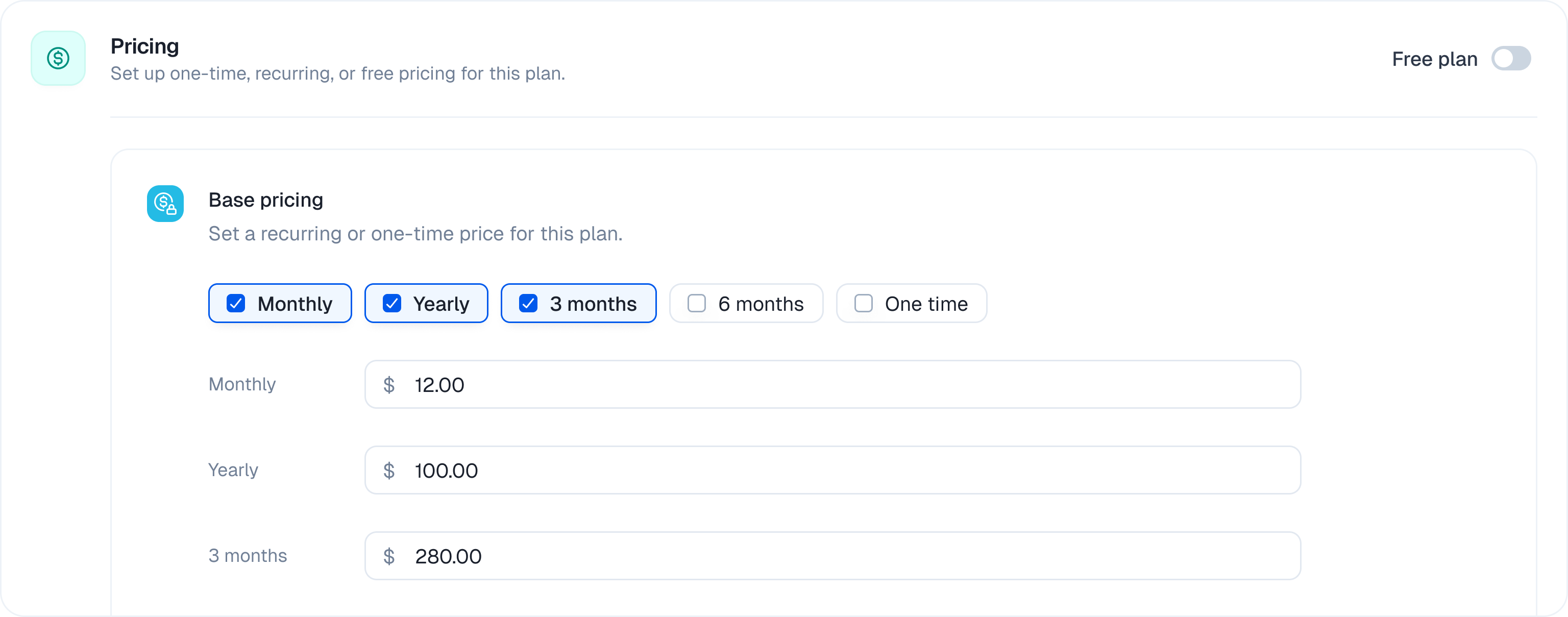
- Open a draft plan and make sure it is set to Paid.
- Under Billing cycles, select the recurring intervals you want to offer, such as 28 days, Monthly, 3 Months, 6 Months, or Yearly.
- Enter the price for each interval.
- Click Save.
A 28-day subscription renews every four weeks. It is not the same as a calendar-month subscription. If the 28 days option is not visible for your organization, contact Kelviq support to have it enabled.
Subscription lifecycle
Kelviq handles recurring payments automatically. This includes:- Charging the saved payment method at the end of each billing cycle
- Sending receipts and tax invoices
- Retrying failed card payments
- Applying prorated charges when a customer changes plans during a billing cycle
Change a subscription
By default, plan upgrades and downgrades take effect immediately. As soon as the change is processed, Kelviq applies the new plan and its feature limits. For a paid change, you can wait until payment succeeds before activating the new plan. PasspaymentBehavior: "activate_on_payment" when you update the subscription:
paymentBehavior to keep the default immediate-update behavior.
Control how a change is billed
PassprorationBehavior when you update a subscription to choose when the customer pays for a mid-period change:
If you omit the field, Kelviq uses your organization’s default. Set the defaults with
PATCH /organizations/settings/: updateSubscriptionProrationBehavior covers upgrades and downgrades and defaults to IMMEDIATE_CHARGE, while migrateSubscriptionProrationBehavior covers plan migrations and defaults to PRORATE_NEXT_INVOICE.
To see the exact amounts before committing to a change, call POST /subscriptions/{subscriptionId}/update/preview/ with the same payload. If credits exceed the new charge, no payment is collected and the remainder is kept as customer credit.
Wait for payment before changing access
activate_on_payment keeps the customer’s current subscription active while payment for the change is pending. This prevents an unpaid plan change from replacing working access.
Card payments that do not require authentication are usually completed during the update request, so the status change can happen immediately. When the payment method requires customer action, continue using the existing subscription until the updated subscription becomes
active.
Upgrades
Under the defaultIMMEDIATE_CHARGE proration behavior, Kelviq prorates the price change against the time left in the current billing period. It credits the unused portion of the old plan, charges for the remaining portion of the new plan, and collects the net difference. See Control how a change is billed for the other options.
With activate_on_payment, Kelviq waits for that payment to succeed before activating the upgraded plan.
For example, if a customer moves from a $100 monthly plan to a $200 monthly plan halfway through the period, the approximate calculation is:
The exact amount depends on when the upgrade is processed. Existing usage counters are retained and evaluated against the new plan’s limits.
Downgrades
Under the default payment behavior, downgrades also apply immediately. If the customer has unused value on the higher-priced plan, Kelviq converts it to account credit and applies that credit to future invoices.Cancel a subscription
When cancelling, choose whether the subscription should end immediately or at the end of the current billing period. A plan downgrade and a subscription cancellation are separate actions: the downgrade follows the payment behavior you choose, while the cancellation follows the timing option you select.Refund a cancelled subscription
Kelviq does not automatically refund unused time when a subscription is cancelled mid-period. You decide whether to issue a full refund, a partial refund, or no refund. For a usage-based subscription, calculate the refund under your own policy using the customer’s consumed usage and remaining time. Kelviq does not currently calculate usage-adjusted refunds for you. Once you decide the amount, open the corresponding order in the dashboard and issue the full or partial refund there.Failed subscription payments
A failed automatic card payment does not cancel the customer’s payment authorization. Kelviq can use the same authorization for later attempts and future billing cycles. If the customer pays the failed card invoice manually, automatic payments remain active. Kelviq will still use the saved payment method for the next billing cycle.Card payment retries
When an automatic card payment fails, the subscription moves topast_due. Kelviq retries the payment up to eight times over the next 14 days. If recovery is unsuccessful, Kelviq cancels the subscription.
After each failed attempt, Kelviq emails the customer a link to pay the invoice. The customer can also use the Customer Portal to update their payment method.
You do not need to schedule retries, send card payment links, or ask the customer to set up automatic payments again. Kelviq handles this recovery flow.
This retry schedule applies only to cards. Kelviq does not retry a failed non-card renewal or send a recovery payment link. The subscription is canceled after the payment fails.